

How To Create Your Own Mtproto Proxy
Creating your own official MTProto Proxy with channel promotion (Very easy way)
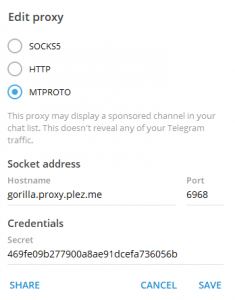
As you might already know that Telegram has been blocked in Russia and Iran so now it is a time for raising a proxy question. Telegram has officially released their proxy and it is open source (written in C programming language). But this can be compiled only on Linux. The tutorial says "simply run make" but that is not true. It is not that simple as it was excpected. But I'm here to provide a super easy way to install an MTProto Proxy on your Linux VPS from zero. Note: this article was originally written in English, please view the English version for better understanding and ignoring automatic translations. Note: If you are on Windows PC you will need Putty to connect to your server. Note: we don't setup the promotion channel yet. It will be done later. This is because in this tutorial we assume that you don't have access to Telegram at all, but you have managed to get Android/iOS/Desktop client and can't connect. So that's why we set up the proxy first, then connecting over it and only when we have access we will set promoted channel. Where: 6968 – is the port you want your server to be accessible on Now, lets find out the secret for connection And search for "Secret 1: 469fe09b277900a8ae91dcefa736056b". So, now in Telegram client enter Hostname = IP of your VPS or a domain name pointed to this ip (it's your VPS IP address you used for connecting using SSH), then port (in this case 6968) and the secret from message above, and pless SAVE or CONNECT. And yes, you can use this proxy too (if it will available). Explanation of new parameters: SECRET=469fe09b277900a8ae91dcefa736056b – pass the same secret from step 2. Or any other 32 characters hash (you can use md5), just don't forget then to set this password in your client too. I recommend to use the same from step 2. TAG=1d3eb6dd135e4aaff7de0fd614124b4c – Tag, that you got from the bot in step 3. And that's all. Now the users of your proxy will see a promoted channel. If you feel quite experienced, visit the https://hub.docker.com/r/telegrammessenger/proxy to get more info. Everything is described on my GitHub fork https://github.com/p1ratrulezzz/MTProxy-1 Visit the page of my fork for PHP MTProxy on GitHub as you also will find information and links to other proxy implementations. But they doesn't support promoting channels yet. If you wan't to create a server on Windows, use Java implementation from GitHub (open Releases and download the latest, and run using java -jar mtoxy<version>.jar) Also, check my first post about MTProto Proxy 262,381 total views, 73 views today
Block, block, proxy
Requirements
Install, check, go
apt-get update apt-get install docker.io
docker run -d -p6968:443 --name=mtproto-proxy --restart=always -v proxy-config:/data telegrammessenger/proxy:latest
docker logs mtproto-proxy
"Success!Your proxy has been successfully registered. You can now pass this proxy tag to the software you are using: 1d3eb6dd135e4aaff7de0fd614124b4c."Copy the hash of proxy tag "1d3eb6dd135e4aaff7de0fd614124b4c", it will be needed further.
Send another command to bot: "/myproxies". He will list your new created proxy and you need to select it, then choose "Set promotion" and send him a link to your channel. docker container stop mtproto-proxy docker container rm mtproto-proxy docker run -d -p6968:443 --name=mtproto-proxy --restart=always -v proxy-config:/data -e WORKERS=0 -e SECRET=469fe09b277900a8ae91dcefa736056b -e TAG=1d3eb6dd135e4aaff7de0fd614124b4c telegrammessenger/proxy:latest
WORKERS=0 – you can set this to any value you want, but for a little server 1 worker is enough (Zero means 1 main process + 0 slave processes). If you want to have 2 processes, set it to 1.Advanced config
Manual installation
Another MTProto Proxy implementations and test servers
This entry was posted in System Administration and tagged android, CentOS, Cloud computing, debian, download, GitHub, ios, linux, MTProto, php, programming, Proxy server, PuTTY, Telegram (messaging service), ubuntu, vds, Virtual private server, vps, windows. Bookmark the permalink. | Short link: http://p1rat.ru/lezzz/nIqPh
How To Create Your Own Mtproto Proxy
Source: https://blog.jazinbaz.in/en/2018/06/creating-your-own-official-mtproto-proxy-with-channel-promotion-very-easy-way.html
Posted by: andersonvearguat.blogspot.com
0 Response to "How To Create Your Own Mtproto Proxy"
Post a Comment